 http://goqr.me/
Tuesday, March 28, 2017

Monday, March 20, 2017
Tuesday, March 7, 2017
Pinterest in the classroom
While doing the Pinterest activity I learned two important
things. The most important thing I learned was how to use it, and how you can
have different boards that house your pins. Boards can have different topics,
to where your pins connect. The second thing I learned was all of the different
things you can find on Pinterest and how there is something for pretty much any
topic you can think of, as a teacher I find this very useful. There are so many
different activity ideas to look into, as well as different materials to add to
your classroom to make it more convenient for learning. I plan to continue to
use Pinterest to get ideas for weekly activities for my students.
The main strength of Pinterest, that I noticed, is how
organized you can be with the specific pins that you find interesting. Like I
mentioned before, you can create different boards which can have specific
topics, pins are then sorted onto each board in which they relate to one
another. During this activity I didn’t really seem to have any challenges, or
questions. For some it may be somewhat challenging to grasp the different
concepts of the boards and pins and how they correspond, but for the most part
it is very user friendly, and I’m excited to continue using it.
Monday, February 27, 2017
Khan/Koller Review
Looking on the Khan Academy site, I first began to look at
some of the subject areas I struggled with in high school. I feel that if I
were aware that this site existed I may have tried it out. While browsing it
was pretty straight forward on how to get to different things and I liked how
organized the site as a whole was. I would definitely encourage students to use
this site, because I know there are many students out there who are like I was
in school. I didn’t like asking for help, or getting extra help outside of the
classroom. I feel that Khan Academy helps students like I was get that extra
help they may need at a more convenient time for them. Watching a few videos I
feel Khan did an exceptionally good job on taking the time to explain each
topic, as well as it being easy to follow along and learn from. Lastly I think
Khan is right when he talked about relying more on credentialing through online
courses. In my opinion I think this style of learn is very much so more
accessible for many students. I feel this way because it allows students to
learn at their own pace as well as in an environment that may be more
comfortable for them.
As I began to explore the courser course offerings, one that
looked the most interesting to me was the courses on Virtual teaching. I think
this is interesting because many schools offer online options, so being able to
take courses to help educators do their job better, as well as teach those that
are interested is beneficial. I feel the Coursera
courses look pretty interesting for the most part; the part of the course that
I looked at was pretty much the same type of assignments each week. It may not
be that way for all course options, but that is one part I didn’t necessarily
like. On the other hand it could very much be like that depending on the type
of professor you have. Lastly I agree
that MOOCs could very much be the “wave of the future.” In my opinion, I would
rather take online courses; I’ve found that my performance is better when I’m
able to do things at my own pace. After graduating I plan on attending a school
with an online program for my major. Columbus State is also one of many schools
that accept Coursera credits for students looking to transfer.
Monday, February 20, 2017
Exploring Standards-Based Lesson Plans
For this
assignment, it was very hard for me to find a lesson plan that met majority of
the developmental domains needed for my specific age group. Without using one of my own,
I wanted to keep my main focus on Early Childhood Education. The lesson I did
decide to use is intended for infant toddlers, who range from twelve to
eighteen months. Its main focus is drawn toward snowflakes and the cold weather.
Teachers gave their students a variety of activities to do in order to introduce
new ideas that connect to their theme for the week. This includes many hands on
activities as well as book readings and activities outside of the classroom.

Early
learning curriculum includes nine different developmental domains. These nine
domains are used as a building block in order to create lessons throughout the
week, as well as creating observations of their student’s development. These
domains are as following.
(Social Studies isn't pictured)

Several
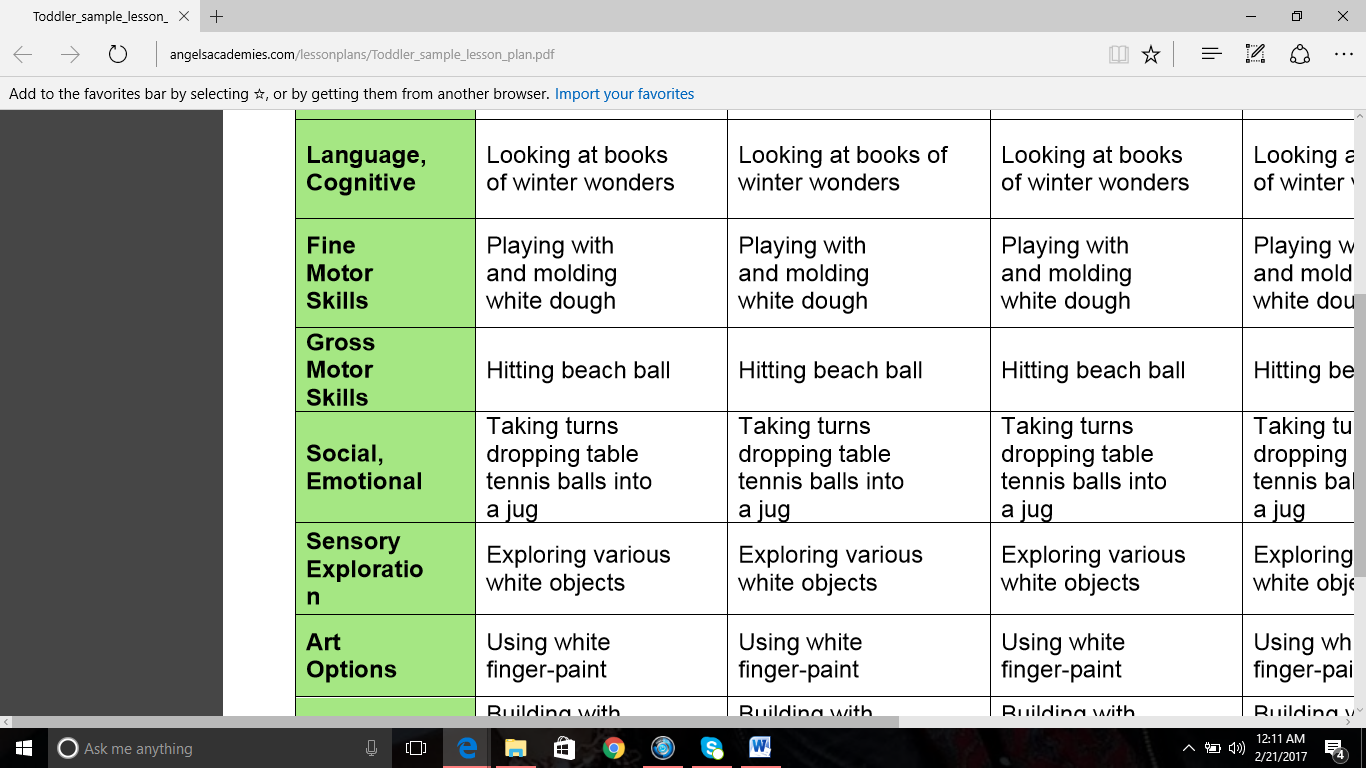
activities featured in this particular lesson meet majority of the nine
domains. For example, “Looking at books of winter wonders” covers literacy,
which isn’t listed, as well as language and cognitive, which is also referred
to as approaches towards learning. “Hitting a beach ball” is listed as gross
motor, but would be classified as physical since it requires the child to use their hands in order to hit an object. “Taking turns dropping table tennis balls into a
jug” is listed under social emotional which is accurate. A add on to that
specific domain is "interacting with peers," and that’s exactly what that entails.
Lastly “Using white finger paint” is considered creative art, this allows the
children to explore different art supplies and create whatever they’d like.
If I were to
use this plan in my own classroom, I would first make sure I put different
activities for each day, giving more opportunity to cover all domains throughout
the week. I feel that my students would enjoy the activities listed, as well as
the other activities that could be added. The one activity that could potentially be
challenging for my group would be “taking turns dropping table tennis balls
into a jug.” In the world of infant toddlers there is no such thing as “taking
turns.” Although we may do our best to instill that type of play, it does get
challenging at times. Another activity that stuck out was “playing with and
molding white dough.” From experience I know that my students would love this. It's also a great fine motor activity, that in most cases, can keep children occupied, and engaged.
Monday, February 13, 2017
Assistive Technology for students with Autism
The
disability I chose was Autism. I selected this because I have
personally interacted, on many occasions, with children who were diagnosed with
autism. The Center for Parent Information and Resources describes Autism as a
developmental disorder that significantly affects verbal and nonverbal
communication as well as social interaction. The article also states that children
diagnosed with autism often engage in repetitive activities, stereotyped
movements, resistance to environmental change, and changes in their daily
routine (Center for Parent Information and Resources). When working in an
environment full of diverse children I have noticed that children with autism
all consistently show an inability to communicate effectively or even communicate
at all. I feel that this alone is the biggest challenge when it comes to trying
to educate a child with autism.


As the development of technology
has grown immensely, so has the ability to maintain effective teaching for
children who may be labeled as “unable to be taught” or “unable to learn.” The
evolution of the IPad has become one of the most influential pieces of
technology being used to help children communicate when communication can’t
physically take place. Different apps were created in order to give people with
autism more freedom of speech. The apps also allowed them to feel at ease when
trying to voice their thoughts, feelings, and needs. School systems as well are
beginning to make IPads accessible for those students who aren’t able to learn
in a “normal” setting.
As
I watched the YouTube video entitled “Apps for Autism” I was able to get more
of a visual on what the apps were like, and how user friendly they are. In this
short video there was a young man who used one specific app called “Proloquo2Go,”(https://itunes.apple.com/us/app/proloquo2go-symbol-based-aac/id308368164?mt=8).
This app provides its user with an endless amount of images as a solution for
ineffective communication. “Autism Express,”
(https://itunes.apple.com/us/app/autism-emotion/id550027186?mt=8)
is also another app used to help children express their emotions. Another app
that I found called “Look in My Eyes,” (https://itunes.apple.com/us/app/look-in-my-eyes-train-engineer/id588178399?mt=8)
is used to help practice eye contact. Lastly, the one thing that really stood
out to me as I watched this video was when the three teachers sat and talked
about why these apps are effective. One teacher said that autistic children
would rather interact with this type of technology rather than a human.
Following, it was stated that this may be because of how consistent the device
is, as well as the user being fully in control (apps for autism, https://youtu.be/F_8b7PgnNQQ).


I feel that for the future, the
use of the IPad will continue to emerge to help positively teach and provide
easy access for those who can’t communicate, or be taught in a typical
classroom setting. It was mentioned in the Apps for Autism clip, that there is
more going on in the brain of autistic children than many may realize. As these
apps are beginning to become more popular, many teachers and parents are able
to see positive progression as these children interact with this device. School
systems as well are trying out some of these techniques in order to find ways
to effectively communicate and learn while children are at school. As well as
cater to each child’s specific needs when it comes to positive brain
development.


References
Sunday, February 5, 2017
Ohio Distance Learning Schools
Looking at the five distance learning options, all the choices
had good qualities in my opinion; but the school that stood out the most to me
would be the Virtual Community School of Ohio. I especially liked this program
because it focuses on many things that parents worry about when looking into
online schooling. For younger and elementary students, the program is very
interactive, giving parents and children the opportunity to work closely together.
The middle and high school program gives students flexibility as well as early
graduation opportunities. All students are provided with a desktop computer or
laptop, and a scanner/printer, as well as being provided with technical
training and support throughout their educational experiences. The Virtual
Community School of Ohio also uses a variety of learning activities for various
learning styles. I also like that there is a special needs program for students
with mental illnesses. As well as assigned staff who work closely with these
students to insure their learning experience beneficial. Lastly, I found it
very helpful that the family and student handbook is linked to their site, so
all the information you may need to know is available to you first hand.
The
program I wouldn’t choose for my child would be The Virtual Schoolhouse. When I
first began to explore their site, I didn’t see much that stood out from any
other ordinary online program. I feel that when looking into online schooling
the things that stand out the most to me is how much parents are involved in
their child’s learning, especially for younger grade levels. Also making sure
that the needs are met for all different types of learners, as well as
providing the resources needed to insure positive growth throughout each
program. Although I wouldn’t necessarily
pick this program for my child, I do feel that its mission is good, and that’s to
allow children to succeed by providing multiple educational options for different
learning styles.
Subscribe to:
Posts (Atom)